@ tofugu.com
— For the latest version, download phonemer from github.
Phonemer is a tool designed for grapheme and syllable detection and positioning in several languages (and multilingual), developed for a friend’s new piece: Georges Bloch. It detects phonemes or syllables and saves them into a CUE file, Max coll file, or as markers in an audio file.
Features
- Grapheme and Syllable Detection: Accurately detects graphemes and syllables in audio files.
- Multiple Output Formats: Saves results in CUE files, Max coll files, or as markers in WAV audio files.
- GPU Support: Runs on GPU by default for enhanced performance.
- Automatic Model Download: Automatically downloads the necessary transformer models from HuggingFace for each language. It mostly uses
facebook/wav2vec2-large-960h,jonatasgrosman/wav2vec2-large-xlsr-53-XXXandalibaba-pai/wav2vec2-large-XXX.
Dependencies
Phonemer requires Python 3.13.5 and has been tested on both macOS and Windows. Other versions have not been tested. Phonemer utilizes Facebook Fairseq’s wav2vec for grapheme detection and the wavfile_OP provided in this distribution or on its own repository here.
Below are the required Python packages:
- numpy – 2.3.2
- torch – 2.7.1
- torchaudio – 2.7.1
- tqdm – 4.67.1
- transformers – 4.54.1
- safetensors – 0.5.3
- pyphen – 0.17.2
- syllables – 1.1.1
- tokenizers – 0.21.4
- huggingface-hub – 0.34.3
Installation
To install Phonemer, follow these simple basic steps:
[ffmpeg]may need to be installed. You can also install it from brew or macport.- When using macport, you may need
export DYLD_LIBRARY_PATH="/opt/local/lib:$DYLD_LIBRARY_PATH". Should be fine with brew. - Move to the directory where
phonemer.pyis located - Create a virtual environment:
python3 -m venv Phonemer_venv
OR
python -m venv Phonemer_venv - Activate the virtual environment:
source Phonemer_venv/bin/activate - Upgrade pip and install the required packages:
pip install --upgrade pippip install torch torchaudio transformers pyphen syllables soundfile torchcodec - Deactivate the virtual environment after use:
deactivate
Usage Examples
- Activate the virtual environment, then…
- Spoken Words in French:
python phonemer.py --input André_Malraux_bio.wav --language French_1 - Spoken Words in English:
python phonemer.py --input George_Orwell.wav --language English_1 --show_vocab --syllables --save_markers --save_coll --save_cue --time_shift -86 - Sung Words in English:
python phonemer.py --input Lady_Gaga_Shallow.wav --language English_1 --save_markers --time_shift -72 - Deactivate the virtual environment.
Outputs
The system generates potential grapheme or syllable outputs, displaying each result with its name and corresponding confidence probability (calculated as the mean of grapheme probabilities for syllables).
--save_cue: save as CUE format file
TRACK 01 AUDIO
	TITLE "ATTTHEAPPE 0.9993300437927246"
	INDEX 01 00:00:00
  TRACK 02 AUDIO
	TITLE "EXXOFT 0.9712339282035828"
	INDEX 01 00:00:44
...
--save_coll: save as coll text format file
0, ATTTHEAPPE 0.9993300437927246;
594, EXXOFT 0.9712339282035828;
1314, THEP 0.9999649922053019;
1474, PYRRAM 0.9438934922218323;
1733, MID 0.9999908208847046;
...
--save_audacity_1: Save Audacity marker (label) file – format 1
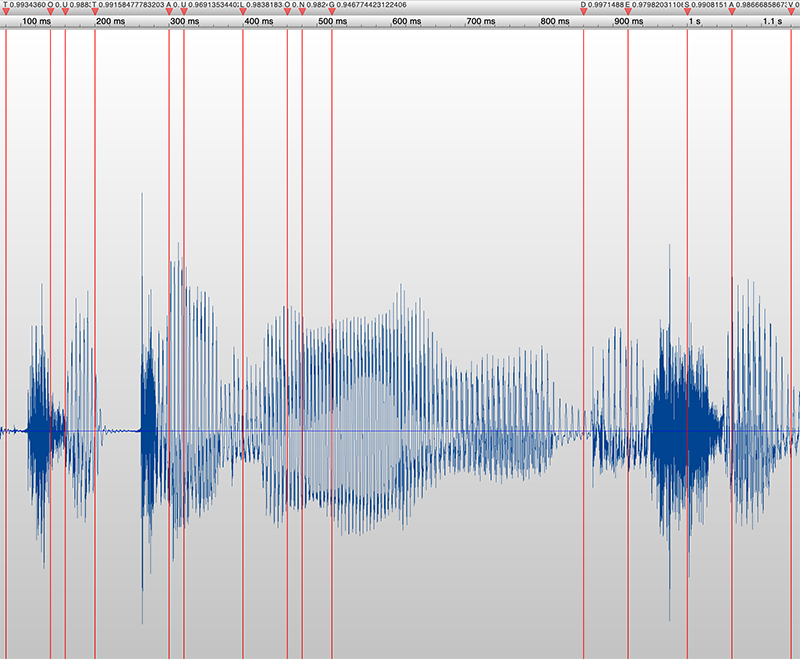
0.080	0.080	T
0.140	0.140	O
0.160	0.160	U
...
--save_audacity_2: Save Audacity marker (label) file – format 2
0.080	0.100	T
0.100	0.160	O
0.160	0.180	U
...
--save_vocab: Save vocab dictionary of the used model
1, ᅡ;
2, ;
3, ;
4, ᅥ;
5, |;
6, E;
7, S;
8, A;
...
--save_markers: save markers in WAV audio file
Command-Line Arguments
| Argument | Type | Default | Description |
|---|---|---|---|
-i or --input |
Required | — | Path to the input audio file |
--syllables |
Optional | False | Outputs syllables; otherwise, outputs graphemes |
--language |
Optional | French_1 | Language used |
--threshold |
Optional | 0.3 | Threshold beyond which probability grapheme is kept |
--save_cue |
Optional | True | Save CUE file |
--save_markers |
Optional | False | Save markers in WAV audio file; channel number etc. are kept |
--save_coll |
Optional | False | Save coll file for Max |
--save_audacity_1 |
Optional | False | Save Audacity marker file – format 1 |
--save_audacity_2 |
Optional | False | Save Audacity marker file – format 2 |
--show_vocab |
Optional | False | Show vocab dictionary of the used model |
--save_vocab |
Optional | False | Save vocab dictionary of the used model |
--time_shift |
Optional | 0 | Adjust possible positive or negative latencies in ms |
Available Languages
See in phonemer.py for the model’s names and URLs.
French_1, French_2, English_1, English_2, German, Spanish, Italian, Portuguese, Russian, Dutch, Polish, Chinese_1, Chinese_2, Finnish, Japanese_1, Japanese_2, Greek, Arabic, Persian, Hebrew, Hungarian, Multilingual_1, Multilingual_2